# SDH-100
# Overview
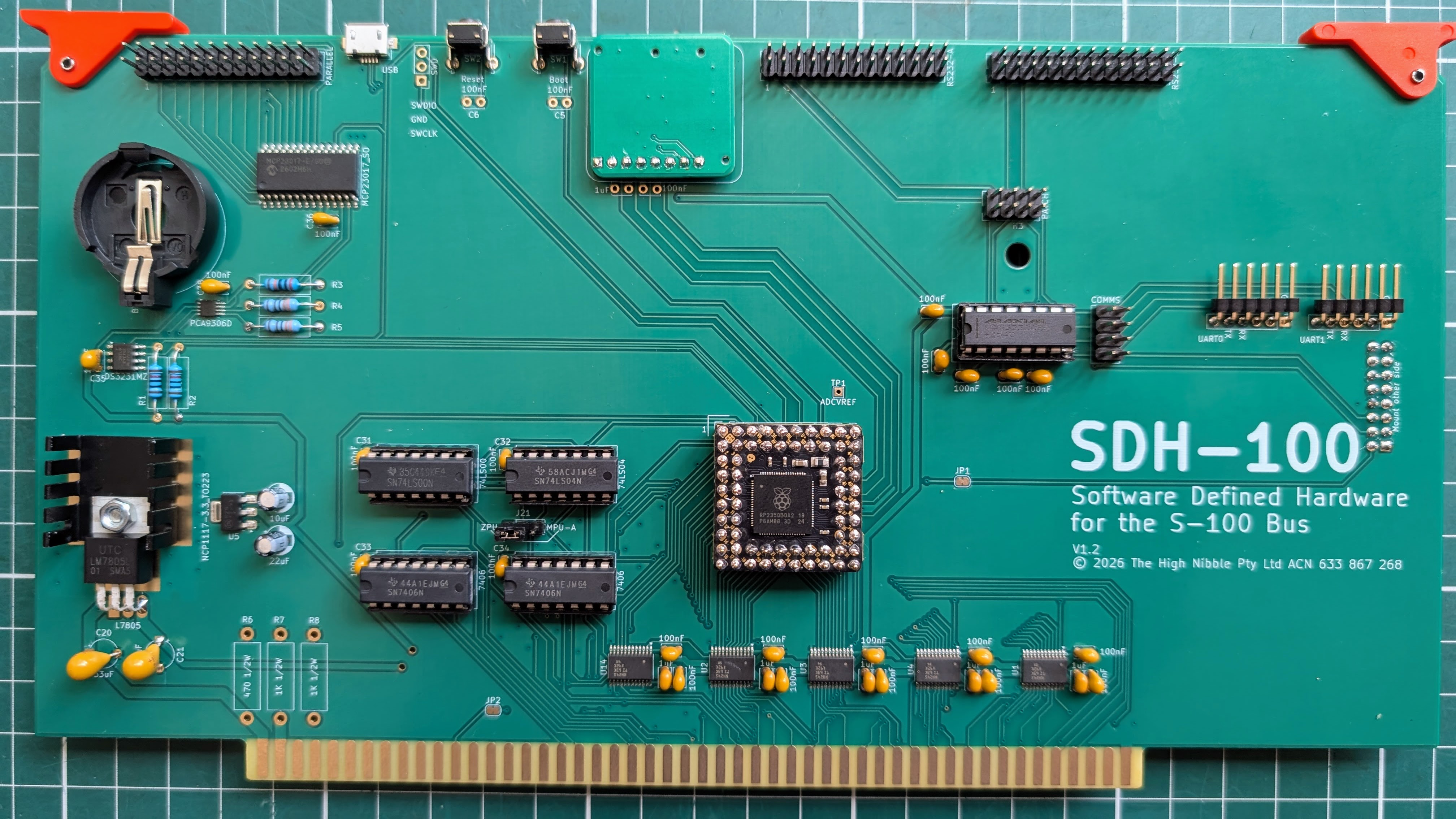
The SDH-100 is an RP2350B-based S-100 bus card that replaces an entire rack of vintage peripherals with a single board. It emulates memory, disk drives, serial ports, a printer interface, a math coprocessor, and — with the optional S-132 companion — graphics hardware, all in firmware. Plug it into your S-100 backplane alongside a Z80 or 8080 CPU card, and you have a complete CP/M system with modern connectivity.
Disk images, ROM files, and system configuration live on a microSD card. Five USB virtual serial ports provide console access, diagnostics, disk management, and printer output from any modern PC. An optional companion display board adds video terminal, colour graphics, and digital/analogue I/O without requiring any additional vintage hardware.
# At a Glance
- One card replaces a rack of peripherals — memory, disks, serial, printer, math, clock, and optionally video and graphics, in a single S-100 slot beside your CPU
- Z80 and 8080 support — auto-detected at startup, no firmware change needed
- CP/M 2.2 and CP/M 3 — separate standard (64 KB flat) and MMU (banked memory) firmware builds
- Four floppy drives — hot-swappable disk images from microSD, plus optional 4 MB hard disk
- USB console — no serial adapter needed; plug in USB and open a terminal
- Built-in debugger — halt the CPU, examine registers, inspect and edit memory, single-step and trace, with memory and I/O port watches
- SD card setup — if the card is missing at boot, the board exposes it as a USB drive for first-time setup
# Who is this for?
The SDH-100 is built for people who already have S-100 hardware. Configure it to provide what your system is missing, keep the parts you want to keep, and turn off any of its emulated peripherals you don't need.
- Owners of a partially-equipped S-100 backplane — you have a CPU card, possibly a CP-A front panel, and not much else. The SDH-100 brings the missing memory, disks, serial ports, printer interface, math coprocessor, and real-time clock in a single card.
- Original IMSAI 8080 (or Cromemco Z-1) owners — vintage hardware, possibly with aging or missing peripheral cards. The SDH-100 follows IMSAI conventions (FIF floppy, VIO, MMU) so it slots cleanly into the original card cage and brings up disks, RAM, serial, and printer without disturbing whichever original cards you want to keep. Your CP-A front panel keeps working independently — the SDH-100 observes the WAIT line but never mediates the panel itself.
- IMSAI 8080 (or Cromemco Z-1) reproduction owners — you have a physical S-100 reproduction (chassis + front panel + backplane + CPU) and need the peripheral rack to match. The SDH-100 supplies memory, disks, serial, printer, math, and RTC in one card; add an S-132 for video and graphics, and you have a complete period-correct system.
- CP/M developers and tinkerers — replace the floppy-swap workflow with disk images on microSD or served from a host PC over USB, and use the built-in debugger to step through ROM, BIOS, and CP/M code running on real silicon.
- System debuggers chasing flaky hardware or unfamiliar ROMs — the monitor offers memory dump / edit, single-step, watchpoints on memory or I/O ports, and full Z80 / 8080 register capture, with no in-circuit emulator or logic analyser required.
- Vintage software preservationists — pair the SDH-100 with the optional FDC floppy hardware add-on (coming soon) to image and mount original 8-inch and 5.25-inch disks. Mix
.dskimages on the microSD card, host-served.unpackeddirectories, and physical drives in the same drive map. - CP/M 3 and banked-memory users — load the MMU firmware build for two banks of 48 KB plus a 16 KB common area, compatible with the CP/M 3 banked BIOS, on a real Z80 or 8080 CPU.
# Memory
The SDH-100 provides the full 64 KB address space from on-chip SRAM, responding to bus memory cycles in real time. Physical RAM cards on the bus are detected automatically and mirrored as shadow RAM, so both the SDH-100 and the CPU see the same data.
- 64 KB emulated RAM in the standard build
- Banked memory in the MMU build: two banks of 48 KB plus 16 KB common area, compatible with CP/M 3 banked BIOS
- ROM loading from microSD — multiple files at boot. Intel HEX files are loaded at the addresses encoded in the file; raw binary files are loaded at address 0000h, with optional offset and length controls.
- Configurable memory map — choose which pages are RAM, ROM, or left open for bus devices
- Shadow RAM — automatically detects and mirrors physical RAM cards on the bus
- Memory test at boot (optional, configurable)
- RAM fill value — set a known value at boot, or leave random
# Disk Storage
The SDH-100 emulates an IMSAI FIF floppy disk controller with four drives. Disk images are plain binary files on the microSD card, so they can be created, copied, and backed up from any PC.
- Four floppy drives (A through D) with independent disk images, plus an optional hard disk on drive I:
- Standard 8-inch format — 26 sectors per track, 77 tracks, approximately 250 KB per disk
- 4 MB hard disk — 128 sectors per track, 255 tracks; mounted on drive I: when a hard disk image is named in the configuration
- Hot-swappable — mount and eject disk images at any time without powering down
- Disk management from CP/M — mount, eject, and list images using built-in commands
- Remote disk management — mount and eject images from a host PC over USB using the included Python tool
- Disk management from S-132 — mount and eject images from the companion display board
Image format
The microSD /DISKS/ folder holds .dsk images only. The optional FDC server can additionally serve:
.dskimages from its own storage- host filesystem directories (
.unpacked) dynamically served as CP/M filesystems - physical floppy drives (
A.fdc,B.fdc) — coming soon, via the optional FDC floppy hardware add-on
# Serial I/O
Two independent serial channels provide console and auxiliary connectivity, compatible with IMSAI SIO-2 software.
- Port A (console) — directly accessible via USB, UART with DB25 connector, or S-132 companion link
- Port B (auxiliary) — accessible via USB and a second UART with DB25 connector
- Baud rates — 9600 to 115,200 on UART; full speed over USB; 2 Mbaud over S-132 link
- Virtual baud rate — optionally throttle USB output to simulate a real serial line speed, for software that depends on character timing
- USB and UART simultaneously — USB pass-through mode mirrors console traffic to the UART connector, so both a local terminal and a remote USB session can be active at once
- TTL or EIA levels — on-board MAX3232 provides RS-232 levels on DB25; FTDI header available for TTL
# Printer
Three output backends are selectable in the configuration file.
- File — print output saved to a text file on the microSD card
- Centronics parallel — driven through an on-board parallel adapter; connect a printer with a standard Centronics cable
- S-132 companion — print output forwarded to the S-132 display board with flow control
When a host PC opens the LPT USB port, printer output is redirected to the host instead of the configured backend, allowing capture or forwarding.
# Arithmetic Processor
The SDH-100 includes a full AM9511 APU instruction set emulation, providing fast math for programs that use it.
- 16-bit and 32-bit integer arithmetic (add, subtract, multiply, divide)
- 32-bit floating-point arithmetic (add, subtract, multiply, divide, square root, trigonometric and logarithmic functions)
- Full status reporting — overflow, underflow, divide-by-zero, and sign flags
# Real-Time Clock
An on-board DS3231 battery-backed clock provides accurate timekeeping that survives power cycles.
- Auto-detected at boot via I2C
- Read and set from CP/M using built-in commands
- Battery-backed — time maintained when the system is off
# Programmable Timer
A programmable interrupt timer generates periodic interrupts to the CPU. Today the timer fires every 100 ms at the standard interrupt vector; software can start and stop it. Future firmware will expose configurable interval and vector selection.
- Start and stop from software — enable or disable the periodic interrupt at any time
- Configurable interval in milliseconds (planned)
- Selectable interrupt vector (planned)
- Auto-reload — timer re-fires automatically after each interrupt
# Display and Graphics (with S-132 Companion)
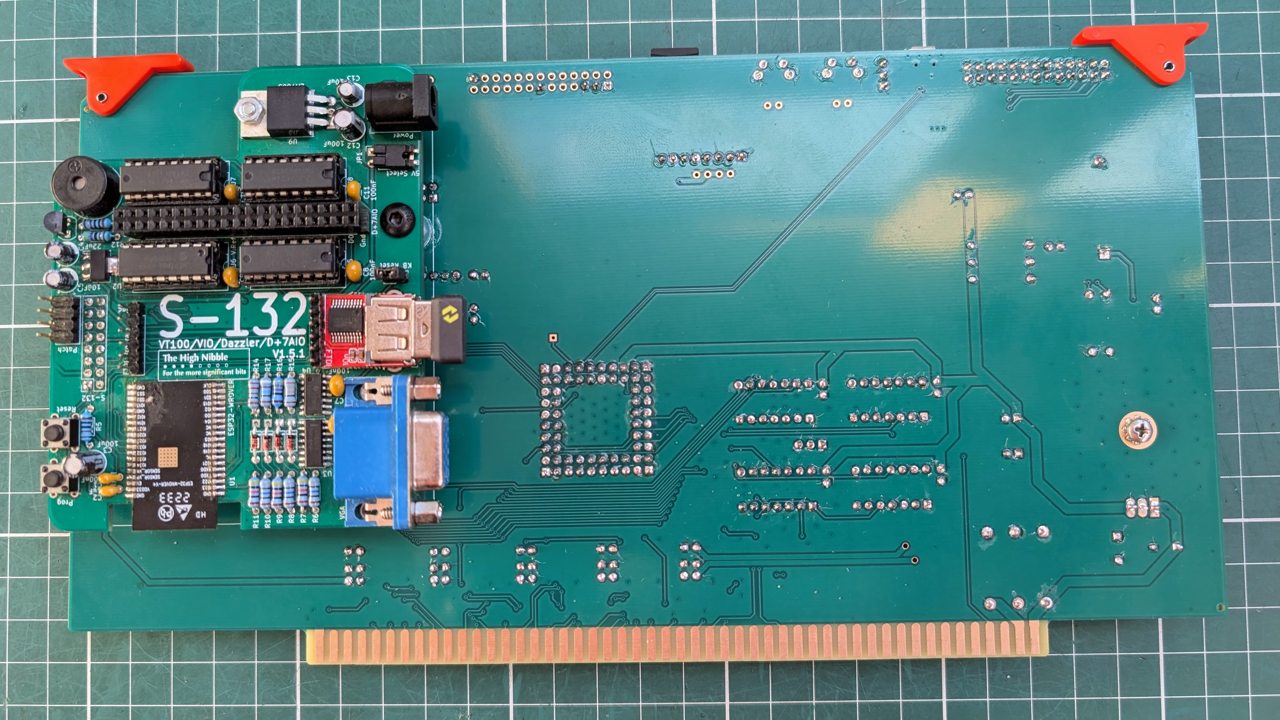
The optional S-132 companion board connects via a single UART and is auto-detected at power-on. No firmware or configuration changes are needed; the same firmware build works with or without it.
- VT100 terminal emulation — full console with keyboard input
- IMSAI VIO — memory-mapped text display with four selectable modes: 80x24, 40x24, 80x12, 40x12
- Cromemco Dazzler colour graphics — low-resolution colour raster graphics with 512-byte or 2 KB framebuffer, 30 Hz refresh
- Cromemco D+7A digital and analogue I/O — eight digital lines plus seven analogue inputs and two analogue outputs
- Keyboard input — delivered to the program through the active terminal interface (SIO Port A in VT100 mode, IMSAI VIO keyboard ports in memory-mapped video mode)
# Coexistence with vintage hardware
The SDH-100 is designed to share the S-100 bus with real cards rather than replace them. The CPU itself is always real silicon — the SDH-100 has no instruction-fetch path of its own.
- Real CPU card — required. The SDH-100 emulates the hardware around an 8080 or Z80 CPU; it does not emulate the CPU.
- Real RAM cards — automatically detected at boot and mirrored as shadow RAM, so the SDH-100 and the CPU see the same data. The memory map can be configured so SDH-100-emulated pages and real RAM cards do not collide.
- Real I/O cards — the SDH-100's emulated peripherals can be moved off any port base via
boot.confto leave room for real cards on the bus. - IMSAI CP-A front panel — if a real CP-A is present, it operates independently of both the SDH-100 and the S-132. The CP-A drives WAIT, RESET, and EXTCLR directly on the bus; the SDH-100 observes WAIT but does not mediate the panel.
# USB Connectivity
A single USB cable to a host PC provides console access, diagnostics, disk management, printer output, and file transfer. No drivers are required on most operating systems.
| Port | Name | Purpose |
|---|---|---|
| CDC #0 | TTY | Console terminal (SIO Port A) |
| CDC #1 | UC1 | Auxiliary terminal (SIO Port B) |
| CDC #2 | MON | Boot log and SDH-100 Monitor |
| CDC #3 | FDC | Disk image management channel |
| CDC #4 | LPT | Printer output |
| MSC | — | microSD card file access |
The BOOTSEL button toggles the SD card mass storage interface at runtime, so you can copy files to and from the SD card without removing it from the board.
# Interactive Debugger (Monitor)
A built-in debugger is accessible at any time over the USB MON port. The debugger operates independently of the running program and can halt, inspect, and resume the CPU without disturbing the system state.
TIP
Activate the monitor by pressing Enter twice quickly (double Ctrl-M) in a terminal connected to the MON interface.
# Memory Inspection
| Command | Description |
|---|---|
| D | Dump memory (hex and ASCII) |
| E | Enter and edit memory interactively |
| F | Fill a memory range with a value |
| M | Move (copy) a block of memory |
| S | Search for a byte pattern |
| C | Compare two memory regions |
| SM | Display the memory page map |
TIP
Each of D / E / F / M / S also has a shadow variant (SD, SE, SF, SC, SS) that operates on the local shadow RAM copy without taking the bus, which is faster and non-intrusive. (SM is the memory map; it is not a shadow variant.)
# Disassembly and Assembly
| Command | Description |
|---|---|
| L | Disassemble memory (continues from last address; from PC if halted) |
| A | Assemble interactively at an address (. exits) |
Both commands render or accept mnemonics in the dialect set by DI / DZ (default: live CPU mode).
# CPU Control
| Command | Description |
|---|---|
| R (or H) | Halt the CPU and display all registers |
| G | Resume execution, optionally at a new address |
| I | Read a byte from an I/O port |
| O | Write a byte to an I/O port |
On a Z80, the R command displays PC, SP, AF, BC, DE, HL, IX, IY, I, R, and all alternate registers (AF', BC', DE', HL') along with individual flag bits. On an 8080, it displays PC, SP, AF, BC, DE, HL, and flags.
The I and O commands work both while the CPU is running (one-shot, with interrupts enabled, CPU continues) and while halted (CPU stays halted, allowing multiple port reads and writes before resuming).
# Display Dialect
| Command | Description |
|---|---|
| DI | Force 8080 (Intel) dialect for L, A, R, and trace output |
| DZ | Force Z80 (Zilog) dialect for L, A, R, and trace output |
The dialect is purely cosmetic — it controls mnemonics, flag-bit names (H/V vs A/P), and which register fields R prints. It does not change how the CPU is captured or how trace and step decode instructions; those always follow the actual hardware CPU. Without DI / DZ the dialect tracks the live CPU automatically.
# Trace and Watch
| Command | Description |
|---|---|
| T | Step into one instruction (or n with optional inter-step delay) |
| U | Step over CALL / RST (treats subroutines as a single step) |
| T+ / U+ | Trace until a tight loop is detected (caps at 4096 steps by default) |
| W | One-shot watch on memory or I/O port range; halts on first hit. Requires the CPU to be halted first (use R). Bare W (no args) re-arms the last-set watch. |
| Z | Abort an active watch |
# Port Caches
| Command | Description |
|---|---|
| PI | Display the last value seen on each input port |
| PO | Display the last value seen on each output port |
| PC | Clear both port caches |
# Shadow RAM Verification
| Command | Description |
|---|---|
| V | Verify shadow RAM against physical bus memory |
| Y | Sync shadow RAM from physical bus |
The full command reference and concept explanations live in the SDH-100 Monitor Reference.
# Configuration
All settings are stored in a plain text file (boot.conf) on the microSD card. Edit it with any text editor on a PC, or update it from CP/M using the built-in host commands.
# Key Settings
| Setting | Description |
|---|---|
| ROM_LOAD | ROM image files to load at boot (comma-separated) |
| RAM_MAP | Memory mapping: AUTO or explicit page ranges |
| RAM_SET | RAM fill value at boot |
| MEM_TEST | Run memory test at boot |
| BOOT_JUMP | Inject a 3-byte jump at 0000h before the CPU starts (e.g. an initial reset vector) |
| BOOT_LOG | Boot log verbosity and ANSI colour handling |
| HARDDISK | Hard disk image filename to mount on drive I: (basename, no .hdd extension) |
| FDC.transport | Disk-management transport: USB (default) or UART |
| FDC.uart.drives | Pre-mount drive map for FDC.transport=UART |
| UART0 / UART1 | Baud rate and format for each serial port |
| SIO.A.baud / SIO.B.baud | Virtual baud rate limiting |
| LPT.device | Printer backend: FILE, PARALLEL, or S132 |
| USB.tty / USB.uc1 | USB-to-UART pass-through mode |
| USB.disk | AUTOMOUNT to expose the SD card as USB mass storage on host connect |
| USB.debug | Log USB connect / disconnect events |
All I/O port base addresses are configurable (SIO.iobase, FIF.iobase, APU.iobase, etc.), allowing the SDH-100 to coexist with other S-100 peripheral cards. Full settings are documented in the Boot Configuration Guide.
# System Information from CP/M
Built-in commands accessible from CP/M programs provide runtime information and control.
| Command | Description |
|---|---|
| SI | Firmware version, clock speed, and system status |
| SE | Current configuration (all boot.conf settings) |
| SL | Boot log replay |
| SM | Memory page map |
| SD / LD | Show drive map / list available disk images |
| MD / ED | Mount / eject a disk image |
| VS / RS | Verify / re-sync shadow RAM |
| SR / UR | Show / update the real-time clock |
| GC / PC | Read / write boot.conf directly from CP/M |
The full reference for the CP/M-side SDH.COM utility is in the SDH.COM User Manual.
# Firmware Installation
Two firmware builds are provided as UF2 files:
- Standard (
SDH100_vX.Y.uf2) — 64 KB flat memory, suitable for CP/M 2.2 - MMU (
SDH100_vX.Y_MMU.uf2) — banked memory, required for CP/M 3
To install or update firmware: hold the BOOTSEL button while connecting USB. The board appears as a USB drive. Copy the UF2 file to it. The board reboots automatically with the new firmware.
First-time SD card setup
If the microSD card is missing or unformatted at boot, the board pauses startup and exposes the SD card slot as a USB mass storage device, so you can copy boot.conf and your disk images to a fresh card without any other tooling.
# Specifications
| Parameter | Value |
|---|---|
| Processor | RP2350B (Pimoroni PGA2350) |
| Clock speed | 384 MHz (Z80 mode) / 300 MHz (8080 mode) |
| Bus interface | S-100 |
| CPU compatibility | Z80, Z80A, 8080 |
| Memory | 64 KB (standard) / 2 x 48 KB + 16 KB common (MMU) |
| Disk drives | 4 (IMSAI FIF emulation) |
| Disk formats | 8-inch floppy (~250 KB), 4 MB hard disk |
| Serial ports | 2 (IMSAI SIO-2 emulation) |
| UART levels | TTL (FTDI) and RS-232 (MAX3232, DB25) |
| USB | 1.1 device — 5 CDC + 1 MSC |
| Storage | microSD (FAT32) |
| Clock chip | DS3231 (I2C, battery-backed) |
| Printer interface | MCP23017 (I2C, Centronics parallel) |
| Math coprocessor | AM9511 APU (emulated) |
| Companion board | S-132 (optional, auto-detected) |
| Firmware update | UF2 via USB |
# Bill-of-Materials & assembly notes
# Availability
The SDH-100 is available to order as of May 2026.
# Expression of interest
I accept expressions of interest via email. If you send email to info@thehighnibble.com I will add you to the list.
Once a kit is available for you within the month, I will contact you to confirm your order.
The price for the kit is USD$300 and in addition you also pay for postage, tariffs and any PayPal transaction fees.
# News & Updates
You can stay up-to-date with news about additions to this site, or new YouTube videos demonstrating the features of the SDH-100 by following on Twitter @TheHighNibble and subscribing to TheHighNibble YouTube Channel


# Forum
TheHighNibble forum has been set up on GitHub. The forum is public and readable by anyone but if you wish to post you need to become a member.
Membership requires you to have GitHub account. Email to info@thehighnibble.com with your GitHub name and I will send you an invite to join the discussion forum.